|
»
Is APR compatible with my modem?
APR will detect if it can take advantage of your modem voice capabilities. If it's not possible to
work it will show you a message that "your modem is not compatible with IS101 command set".
Many modern modems now support this standard and many manufacturers adopt but nothing is for sure.
Usually modems having Conexant chip will respond positively and APR will work sufficiently.
»
The recording level is very low. How I change it?
Sometimes the recording level is really low. If your modem can adjust its preamplifier you can
increase the level to meet your requirements. Click "Options" menu command, then "Settings".
Settings form will appear. Go to Parameters tab. The recording level has a default value 128.
Increase it or decrease as you want and make a recording to check if it has the right level.
»
How can I create a new list of recordings?
On the lists area right click the mouse. A pop up menu will appear. Choose "Add list" to make a
list below your current list or click "Add sublist" to create a sublist.
»
If I delete a list do I lose my responding recordings?
Yes. You have to be careful because if you decide to delete o list all of the recordings belonging
to that list will be deleted. If you want to delete only a recording just select it and delete it.
»
Is it possible to use mass actions, like mass copy, mass delete mass move?
APR supports mass actions, like mass copy, mass delete, and mass move to another list. Select the
recording you want by holding the shift key down and pressing the down arrow or by holding the
CTRL key down and clicking with the mouse the files you want, click the right button for your mouse
and select the appropriate action. If you want to select all of the recordings press CTRL^A at the
same time and all of them will be selected. After pressing any other key after a selection has
been made the selections will come to its original state, that's deselected.
»
How do I write a memo for my recording?
Click the recording you want to write a memo and click the right button of your mouse. After the
pop up menu appears click memo. An input text box will appear where you can write your memo. The
same action is done with the main menu commands.
»
I installed a new modem. How APR will find it?
Click "Option" main menu command, and then "settings" and "modem" tab. Click the "find modems"
button to initiate a new scanning modem procedure. Select the modem you have installed and click
"ok" button.
»
Is it possible to record a conversation and at the same time use Internet?
If you use your analogue voice modem to connect to Internet this is not possible. Your modem has to
be available for this task. If you accidentally call APR when you are connected to Internet it
will inform you than the serial port is not available to connect to. If you use a different mode
for Internet connections such as a DSL or ISDN modem then you can use it freely.
»
Can I use APR in Linux or Mac?
No. APR may be installed only on Microsoft Windows platform. That's Win 95,98,ME, NT and XP.
»
How can I release my modem?
If you use your modem to connect to Internet you have to release it from APR. Click "Options"
main menu command and the click "Modem off". Then your modem is released and you can use it for
any other purpose.
»
I don't like the default fonts. Can I change it?
Yes you can change it. Click "Options" main menu command then "settings". After the settings form
shows click the "General" tab and click the "Fonts" button. Select your favourite fonts and click ok
to activate it.
»
Does APR supports TAPI?
No. For the time being APR doesn't support TAPI.
»
Is there a limitation on the time of recording on this full version software?
The full version has no limitation.
»
What file naming convention does it use to save the recorded files?
Format X _YYYYMMDD_HHMMSS.wav
Example 1_20041101_222258.wav
(channel)_(date)_(time).wav
date : YYYYMMDD
YYYY 2004 year
MM 11 month
DD 01 day
Time : HHMMSS
HH 22 hours
MM 22 minutes
SS 58 seconds
»
Modem does not support v.253/IS-101 information is displayed.
Advanced Phone Recorder works only on modems that support this standard.
Please visit the page regarding modems.
»
How to record conversation above 1 min?
You have to order the full version. The full version has no recording time limit.
»
I’ve just downloaded your APR software and I just want to know if my PC card modem V34 by US Robotics
can support what is required by your software.
You can install and test the software. If APR can work on your modem you will be able to record calls.
The only limitation is that recordings are limited to 60 sec duration.
If you need further assistance launch APR and click help -> ask support.
A mail will be sent to us with your modem parameters.
»
When a person or machine answers a phone call will APR record everything and save every call in
a separate file to be played with media player or Real Player?
Yes. Every incoming call answered by a machine or a person will be recorded in a separate file.
You can listen to your recordings either with medial player, Real player or APR internal player.
»
What is longest call I can record? One hour or more?
The full version has no recording time limit.
»
Is there any way to save in other formats?
Yes click options -> settings -> file compression format to select the format you like.
»
Could you please advice, if the product is compatible to UK spec?
This software uses a voice modem as the recording device for call recording. A voice modem
supporting V.253 standard is adequate. We have many customers that use it in UK. You may try the
demo version to see if it meets your requirements.
»
What additional hardware do I need?
You need only a voice modem. For more information you may visit the
page.
»
Does this software support 2 or 3 modem at the same time?
No, it is a single line recorder. If you need a multi-line recorder then consider our other products
Diacorder USB.
»
Nowhere does it say what type of installation I get. Demo with full features, how long do I use
before I need to pay etc. I need a trial period.
What you have downloaded is a demo. It is fully functional software with one limitation.
There is a 60 sec limit per recording.
»
How can I convert from one format to another?
You cannot convert from one format to another directly from the software.
»
What's the difference between V.253 and IS-101 what does it mean ?
No difference. It is the same thing. It is an ITU standard regarding a voice modem commands.
»
What is a voice modem?
Most modems can be classified with these characteristics:
Data/fax
Data/fax/voice
Data/fax/voice/speakerphone
Voice generally means that the modem is capable, with appropriate software, of supporting telephone
answering machine functions: the modem can 'record' and 'play' to the Windows. The answering machine
software will also use the sound card on the machine to play and record. The software may also include
functions to dial or answer calls using your sound card's microphone and speakers or headphones.
Windows comes with a Phone Dialler. This utility will dial a number with any type of modem; after
Phone Dialler dials a number, you use any normal phone (connected to the 'Phone' jack of the modem)
to complete a voice call.
A modem that includes speakerphone capability will have additional audio components on the modem to
provide an interface for a microphone and speaker or headset. This allows the modem to dial or
answer and provide high-quality full-duplex voice functionality.
Full duplex means you can talk and hear at the same time. Many 'voice' modems when used on voice
calls will provide only half-duplex functionality: at any instant, you can either be talking or
listening. The quality of the audio produced using a voice modem is often a problem.
CALLER ID is not automatically supported by all modems. In most cases, data/fax modems will not
provide any caller id support. The chipsets for voice, speakerphone and even most data/fax modems
are capable of caller id, but the modem must include additional components: the caller id signal is
sent by the phone company between the first and second rings while the phone, or modem is
still on-hook. Modems that support caller id must have a circuit to receive the caller ID
information without taking the modem off-hook.
»
How does the exact setup of the hardware work and with what cable?
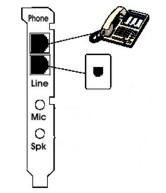
Usually modems have two sockets. Phone and Line. You connect phone and line cables respectively.
The cable is the regular telephone cable with RJ-11 clip.
»
I'd like to prevent the icon from showing on the system tray. Is there a way to hide or prevent
that icon?
No there is no option to hide tray icon.
»
Is it possible to automatically record outbound calls? I see inbound, but not outbound.
No. Automatic recording is for inbound calls. Only manually you can record outbound calls.
»
If you do not support VoIP can I run your product (say on a multi tasking OS eg XP) at the same
time as a VoIP application provided there are no hardware conflicts? (APR uses Voice modem and
VoIP product uses a sound card)
It doesn't support VoIP recording. You can run at the same time with a VoIP application with no
conflicts since the recording interfaces and mediums are quite different. PSTN network on first
case and TCP/IP network on the second.
»
How many channels can be recorder at the same time? Take a typical small business that may say
have 4 outside telephone lines could APR record all four lines?
It is a single channel application. If you need a 4 line call recorder then consider
Diacorder USB.
»
Can the recorded phone conversations be burned to a CD from this software?
The recordings are saves as standard WAV files. They cannot be burned directly to a CD from the
software. You have to use another software that burns CD's.
»
How do I save files in MP3 format?
Click options -> settings -> general tab -> "File compression format" select button.
Then select an MP3 format. Be aware that the extension the file is saved is still ".wav" but its actual
format is MP3. You can then rename its extension to MP3.
»
Do you have an API or COM interface that is available to developers?
There is no API for developers.
»
Can it be set up to automatically come on and record both incoming AND outgoing calls?
It can be set up to record automatically ONLY INCOMING calls. For outgoing you have to press record
button to start record and stop button to terminate it.
»
Does it work with VOIP tel. systems?
No, it works only with analogue lines.
»
Will this work with DSL I have filter on my phone line?
Yes it works. The filter splits the DSL high frequency from the low frequency phone signal. If you have
a voice modem I suggest that you download and test demo version.
»
We are trying to use the File -> Copy to Folder... option. The wave file copies correctly.
However, it doesn't allow us to change the name of the wave file: the copied file reverts back to
the original file name.
That's right. It keeps the original name of the file. It's not a "save as" but a "save" action. You
may also select and copy many files. You rename them afterwards.
»
When I playback a recording the distant voice is low and my end is high. How can the voice at the
other end be raised?
Click post processing -> voice equalizer. At the form shown click "apply" button. The voices of calling
and called parties will become of the same level. When you are satisfied with the result click "save"
button to save it.
»
I'm not sure if my modem has a voice recorder or not. Is there a way you can tell?
In order to check if your modem is suitable for APR you have to download, install and run it. If you
don't have the right modem it will show you a message.
»
If APR is connected to the phone line in my home office/study and I pick up the phone (same line) in
another room, will the APR still record the conversation?
Yes since it is on the same line.
»
Is it possible to use your phone recording system with Vonage (VOIP)?
Yes because Vonage has a gateway for analogue phones.
»
Is APR compatible with Microsoft Win Vista and Win Seven?
Yes it is Win Vista and Win Seven compatible.
»
Does Advanced Phone Recorder record and answer two phone lines for users who have two phone lines?
If yes, is there any special modem that must be bought to handle recording and answering for two lines?
APR is a single line recorder. It uses a voice modem as the recording device. If you need a two-line
recorder then we have Diacorder USB.
»
How to connect APR with a DSL / ADSL modem?
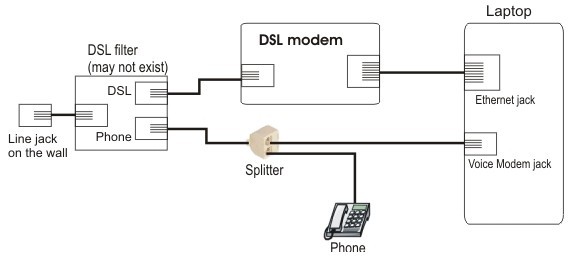
The splitter is connected to the phone jack of the DSL filter. If there is no DSL filter it is connected
to the wall jack.
As you see one cord goes to the Voice modem and the other to your telephone.

This is a splitter. It is a passive component that splits the line to two parts so the modem may tap
the line.
When you complete the connections connections click the record button and if they are correct you will
see the dial tone on the scope instead of a flat line.
»
Does APR work on Comcast digital voice package?
APR application works properly on Comcast Digital voice phone packages. Comcast seems to deliver a
good analogue signal to traditional analogue phones
»
I would like to write the files to an USB type external drive. Can this be configured in the
Advanced Phone Recorder product set-up?
Yes it is possible to configure the software to save the recordings to an external USB drive.
»
When I tried to order this product on-line the order form requests a License number or code..
I called RegSoft.com and they don't know what this is. Please explain.
Before you order this software it is necessary to test it on your modem. Actually it doesn't work on
any modem but on those supporting V.253 standard.
Download the demo version
install it and test it. If you find that it meets your requirements you may order the full version.
The license is found in the demo clicking help -> about. It is the number filled in Regsoft order form.
»
When I purchase the order will I get the software as well?
Advanced Phone Recorder is only software. In order to use it you need a voice modem.
If you have a voice modem you may download the demo version install it and test it.
If it meets your requirements you may order a license by clicking "help" -> "order on line" menu items
(inside from the software).
»
Can your software use a .wav or .mp3 as an outgoing message?
You may use a .wav file or your Text To Speech engine as an outgoing message.
»
I need to know if it will accommodate 4 phone lines on a 5 line system. I also need to know if each
phone in the building needs one and which computer maintains the calls. How long can each recording be?
Is it manual or automatic?
Advanced Phone Recorder in brief APR is a single line recorder. It needs a voice modem to work on and
it keeps files and database locally to the computer it is connected to.
Outgoing calls are recorded manually. Incoming calls automatically or manually. There is a
demo version
you may download install and evaluate if it meets your requirements.
If you operate 5 lines yourself as you have told me and you need all those conversations recorded to
your PC locally then consider Diacorder USB.
»
Say I have a microphone and headset attached to a computer. Can I use APR to answer incoming calls,
so that I make talk to a caller through the voice modem?
No. It doesn't work like this. You need a "speakerphone voice modem". You attach mic and headset to
the modem and then you use it as a regular telephone controlled by the software.
Unfortunately APR cannot do that.
»
Someone calls and no one is in the office. He listens to a recorded message giving information.
What is the maximum length of the recorded outgoing message to a caller?
There is no length to the message the AM plays to the caller.
In options there is a "maximum recorded message length" but this refers to the message the caller
leaves to the AM.
»
Will the Advanced Phone Recorder record calls from a handset other than the one wired through the modem?
APR can only tap the line via a modem. It's not possible to work via the handset.
|